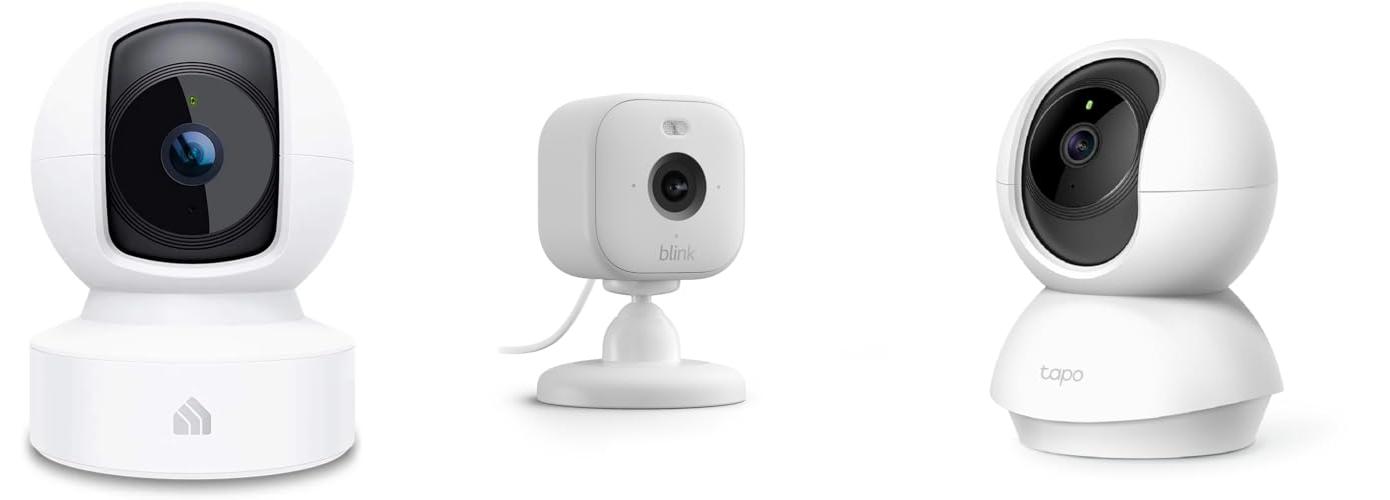
Ever wonder what your feline friend gets up to when you’re not home? Do you miss their silly antics or worry if they’re okay? Many cat parents feel the same way! It’s tough to choose the perfect cat camera because there are so many out there. Some have fuzzy pictures, others are too complicated, and some just don’t capture those adorable moments.
But what if you could peek into your cat’s world and even interact with them from afar? This blog post is here to help! We’ll break down what makes a great cat camera, so you can stop guessing and start watching. You’ll learn about the best features to look for, what to avoid, and how to find a camera that fits your needs and your budget.
By the end of this guide, you’ll have the confidence to pick a cat camera that brings you peace of mind and plenty of kitty-watching fun. Get ready to discover the world through your cat’s eyes!
Our Top 5 Cat Cameras Recommendations at a Glance
Top 5 Cat Cameras Detailed Reviews
1. Kasa Indoor Pan/Tilt Smart Security Camera

Rating: 8.6/10
Keep an eye on your home, pets, or little ones with the Kasa Indoor Pan/Tilt Smart Security Camera (EC70). This white, compact camera offers sharp 1080p HD video, letting you see everything clearly, even in the dark. You can control it easily with the Kasa app, pan and tilt it to get the perfect view, and even get alerts if it detects movement or sound.
What We Like:
- Sharp 1080p HD video quality provides a clear picture.
- You can move the camera remotely using the Kasa app to see more.
- It sends alerts to your phone when it detects motion or sound, so you know what’s happening.
- Night vision lets you see clearly even when it’s dark, up to 30 feet away.
- You can choose to save recordings to a microSD card or use the Kasa Care cloud plan.
- It works with Alexa and Google Home, making it easy to use with other smart devices.
- “Smart Actions” let the camera trigger other Kasa devices, like turning on lights when motion is detected.
What Could Be Improved:
- The camera only connects to a 2.4GHz Wi-Fi band, which might be slower than 5GHz bands.
- Advanced features and longer cloud storage require a paid Kasa Care subscription.
This Kasa camera is a user-friendly option for home monitoring. It offers good value for its features, making it a solid choice for peace of mind.
2. Blink Mini 2 (newest model) — Home Security & Pet Camera with HD video

Rating: 9.0/10
The Blink Mini 2 is a smart security camera that keeps you connected to your home. This plug-in camera is easy to set up and use right from your smartphone. It offers clear video and audio, making it a great tool for keeping an eye on things.
What We Like:
- See everything in 1080p HD video.
- The built-in spotlight lets you see in color even at night.
- You can talk and listen using two-way audio.
- It sends motion alerts to your phone so you know what’s happening.
- You can use it outside with an extra adapter.
- It works as a doorbell chime for your Blink Video Doorbell.
- It’s easy to set up in just minutes.
- Works with Alexa for voice control.
What Could Be Improved:
- Some features, like continuous recording and person detection, need a subscription plan.
- Outdoor use requires a separate weather-resistant power adapter.
- Local storage options also require additional purchases like a Sync Module 2 or Sync Module XR.
The Blink Mini 2 offers a lot of features for its price, making it a solid choice for basic home monitoring. It provides peace of mind and convenience for everyday use.
3. TP-Link Tapo Pan/Tilt Security Camera for Baby Monitor

Rating: 9.0/10
The TP-Link Tapo C200 is a versatile security camera that works great as a baby monitor or pet camera. It offers a clear 1080p picture so you can see everything happening in your home. You can even talk to your family or pets through the camera thanks to its two-way audio feature.
What We Like:
- The camera pans 360 degrees and tilts 114 degrees, giving you a wide view of your room.
- It captures everything in sharp 1080p high-definition video, so you won’t miss any details.
- Its advanced night vision lets you see up to 30 feet away in the dark, keeping your home safe 24/7.
- Motion detection sends instant alerts to your phone, and you can even set off sound and light alarms to scare away intruders.
- You can store recordings locally on a Micro SD card, saving you money on monthly fees.
- The two-way audio lets you communicate with people or pets at home from anywhere.
- You can easily share funny or important video clips with friends and family.
What Could Be Improved:
- The Micro SD card is not included, so you’ll need to buy one separately.
This camera offers a lot of features for its price, making it a smart choice for keeping an eye on your home and loved ones. It’s easy to set up and use, giving you peace of mind.
4. TP-Link Tapo 1080P Indoor Security Camera for Baby Monitor

Rating: 8.7/10
Keep an eye on your little ones or furry friends with the TP-Link Tapo 1080P Indoor Security Camera. This versatile camera works as a baby monitor, a dog camera, and an indoor security camera. It uses your home’s 2.4GHz Wi-Fi to connect. You can see everything clearly with its 1080P high definition video.
What We Like:
- It sends you instant alerts when it detects motion, a person, or even a baby crying.
- You can talk to your pets or family through the camera using its 2-way audio feature.
- It has a built-in siren to scare away unwanted visitors.
- The night vision works up to 30 feet, so you can see clearly even in the dark.
- It works with Alexa and Google Home, letting you view the live feed with just your voice.
- There’s no extra cost to use it as a baby monitor.
What Could Be Improved:
- It only connects to 2.4GHz Wi-Fi, not the faster 5GHz band.
- The night vision range of 30 feet might be limited for larger rooms.
This camera offers a lot of features for its price, making it a good option for monitoring your home and loved ones.
5. TP-Link Tapo 2K Pan/Tilt Security Camera for Baby Monitor

Rating: 9.1/10
Keep a watchful eye on your home, your little ones, and your furry friends with the TP-Link Tapo 2K Pan/Tilt Security Camera. This 2-pack offers crystal-clear 2K HD video, allowing you to see every detail, whether it’s your baby’s latest discovery or your dog’s playful antics. Setup is a breeze, connecting easily via 2.4GHz Wi-Fi and compatible with your existing smart home devices.
What We Like:
- The 2K High Definition video captures sharp, clear images, so you won’t miss a thing.
- Its Pan/Tilt feature gives you a full 360° view, letting you see everything in the room.
- You get instant notifications for motion, people, or even baby crying, without any extra fees.
- It works seamlessly with Alexa and Google Assistant, so you can view the live stream with simple voice commands.
- The 2-Way Audio lets you talk to your pets or comfort your baby from anywhere.
- The built-in siren can help deter unwanted visitors.
- Night Vision provides clear footage up to 30 feet away, even in the dark.
- Device Sharing makes it easy for multiple family members to view the camera feed simultaneously.
What Could Be Improved:
- The camera only connects to the 2.4GHz Wi-Fi band, which might be a limitation for some networks.
- While cloud storage is mentioned, specific details on free vs. paid tiers aren’t always clear.
This TP-Link Tapo camera set is a fantastic option for anyone needing reliable indoor monitoring. It offers great features for the price, making it a smart choice for home security and peace of mind.
The Ultimate Buying Guide: A Purrfect Choice for Your Feline Friend
Choosing the right cat camera can be a delightful way to stay connected with your furry companion when you’re away. These gadgets let you see, talk to, and even play with your cat. Let’s dive into what makes a great cat camera.
Key Features to Look For
When you’re shopping, keep these important features in mind:
- Video Quality: You want a clear picture so you can see your cat’s every move. Look for HD (High Definition) video, usually 1080p. A good camera will show you even the smallest details.
- Night Vision: Cats are often most active at night or in dim light. Night vision lets you see them clearly even when the lights are off.
- Two-Way Audio: This is a must-have! It allows you to hear your cat and speak to them through the camera. You can comfort them or tell them to stop doing something naughty.
- Motion Detection: Some cameras can tell you when your cat is moving around. This is helpful for knowing when they are awake and active.
- Treat Dispenser: Many cat cameras can launch treats! This is a fun way to interact with and reward your pet from afar.
- Laser Toy: Some models have built-in laser pointers that you can control. This can keep your cat entertained for hours.
- Storage Options: Think about how you want to save videos. Some cameras use SD cards, while others offer cloud storage (often with a monthly fee).
Important Materials
Most cat cameras are made from durable plastics. This is good because cats can be curious and might try to bat at or chew on the device. Look for sturdy construction that can withstand a playful paw. The lens should also be protected.
Factors That Improve or Reduce Quality
-
Improving Quality:
- Wide-Angle Lens: This lets you see more of the room, so you don’t miss any action.
- Good Wi-Fi Connection: A strong and stable Wi-Fi connection is crucial for smooth video streaming and reliable communication.
- Easy-to-Use App: The app you use to control the camera should be simple and intuitive.
-
Reducing Quality:
- Poor Lighting: If the room is too dark and the camera doesn’t have good night vision, the video quality will suffer.
- Weak Wi-Fi Signal: This can cause choppy video, laggy audio, and dropped connections.
- Low-Resolution Video: A grainy or blurry picture makes it hard to see what your cat is doing.
User Experience and Use Cases
Cat cameras offer a fantastic user experience for pet owners.
- Peace of Mind: You can check in on your cat while you’re at work or on vacation. This reduces worry and lets you know they are safe and sound.
- Entertainment: Watching your cat play or nap can be very entertaining. The treat dispenser and laser toy add extra fun.
- Training and Behavior: You can use the audio feature to redirect your cat if they are scratching furniture or getting into trouble.
- Bonding: Even when you’re not home, you can still interact with your cat, strengthening your bond.
Choosing the right cat camera means finding one that fits your needs and budget. With these tips, you’ll be able to pick a camera that brings you joy and keeps you connected to your beloved feline!
Cat Camera FAQs
Q: What are the main Key Features to look for in a cat camera?
A: The main key features are high-definition video quality, good night vision, two-way audio for talking to your cat, motion detection alerts, and fun extras like treat dispensers or laser toys.
Q: What materials are typically used in cat cameras?
A: Most cat cameras are made from durable plastics to withstand curious pets. The lens should also be well-protected.
Q: How does Wi-Fi connection affect the quality of a cat camera?
A: A strong and stable Wi-Fi connection is very important. It ensures smooth video streaming and reliable audio, while a weak connection can cause choppy video and dropped calls.
Q: What is the benefit of having night vision on a cat camera?
A: Night vision is important because cats are often active in low light or at night. It allows you to see your cat clearly even when the room is dark.
Q: Can I talk to my cat through the camera?
A: Yes, most cat cameras have a two-way audio feature that lets you hear your cat and speak to them through the device.
Q: What is a treat dispenser, and why is it a good feature?
A: A treat dispenser is a part of the camera that can launch treats. It’s a fun way to interact with and reward your cat from a distance.
Q: What are some common use cases for a cat camera?
A: Common uses include checking on your cat for peace of mind when you’re away, entertaining yourself by watching them, and using the audio to interact or correct behavior.
Q: Do I need to pay extra for cloud storage?
A: Some cameras offer cloud storage for videos, but this often comes with a monthly subscription fee. Others use SD cards which don’t require extra payments.
Q: What does a wide-angle lens do for a cat camera?
A: A wide-angle lens lets you see a larger area of the room, so you can catch more of your cat’s activities.
Q: Is it easy to set up a cat camera?
A: Most modern cat cameras are designed for easy setup. You usually just plug them in, connect them to your Wi-Fi through an app, and you’re ready to go.
In conclusion, every product has unique features and benefits. We hope this review helps you decide if it meets your needs. An informed choice ensures the best experience.
If you have any questions or feedback, please share them in the comments. Your input helps everyone. Thank you for reading.

Hi, I’m Mette Morgan—a lifelong pet enthusiast and the heart behind PetNobs.com.. My journey with animals began at an early age, and over the years, I’ve gathered invaluable experiences and insights on everything from everyday pet care to the unique quirks each animal brings to our lives. Here at PetNobs, I share my genuine passion, practical tips, and personal stories to help you create a loving, well-informed environment for your furry, feathered, or scaled friends. Welcome to my little corner of the pet world—it’s a joy to have you here!